Overview
PrioriTask is a desktop task manager application written in Java (10~20kLOC). It helps users manage their tasks and priorities through automatic priority updating and sorting. The application also features a calendar which provides users with a chronological overview of upcoming deadlines. The user interacts with PrioriTask by using a Command Line Interface (CLI), and has a Graphical User Interface (GUI) created with JavaFX.
Summary of contributions
-
Major enhancement: added the ability to recur tasks weekly
-
What it does: It allows the user to recur tasks weekly. The tasks that are recurred have deadlines that are on the same day of the week as the original task.
-
Justification: This feature improves the product significantly because a user can add tasks that need to be done weekly much more quickly, as compared to with just the feature to add tasks one by one.
-
Highlights: This feature was difficult to implement because there are many ways a user may want to recur a task. Finding a way to recur tasks that can fit most users' needs was a challenge.
-
-
Minor enhancement: added a remove tag command that allows the user to remove specified tags from all entries in PrioriTask.
-
Code contributed: [Functional code] [Test code]
-
Other contributions:
Contributions to the User Guide
Given below are sections I contributed to the User Guide. They showcase my ability to write documentation targeting end-users. |
Removing tags from all tasks : remove or r [since v1.5]
Remove specified tags from all tasks in PrioriTask.
Format: remove t/TAG1 [t/TAG2]…
-
Removes TAG1 and TAG2 (if present) from all tasks.
-
Tags do not have to already exist in PrioriTask.
Examples:
-
remove t/friends t/homework
Removes the tagsfriendsandhomeworkfrom all tasks.
Recurring a task : recurw or rw [since v1.5rc]
Recur an existing task in PrioriTask.
Format: recurw INDEX x/TIMES
-
Recurs the task at the specified
INDEX. The index refers to the index number shown in the last task listing. The index must be a positive integer (i.e. 1, 2, 3, …). -
The task is recurred for the specified number of
TIMES, not inclusive of the original existing task. -
The 1st recurred task has the deadline set to be 1 week after the original task’s deadline. The 2nd recurred task has the deadline set to be 2 weeks after the original task’s deadline, and so on.
-
Priority of the recurred tasks is set to be the original task’s priority when it was last edited using
editor when it was first set usingadd. -
The recurred tasks and their subtasks will be set set as
Not Completedby default. -
All subtasks of the recurred tasks will also be set as
Not Completedby default.
Examples:
-
`recurw 1 x/3
Recurs the 1st task weekly for 3 times.
Deleting a task and all its recurred versions : deleter or dr [since v1.5]
Delete the specified task and all its recurred versions from PrioriTask.
Format: deleter INDEX
-
Deletes the task at the specified
INDEXand all its recurred versions. -
The task must have been recurred before.
-
The index refers to the index number shown in the most recent listing.
-
The index must be a positive integer (i.e. 1, 2, 3, …).
Examples:
-
list
deleter 2
Deletes the 2nd task and all its recurred versions in PrioriTask, if it has been recurred before. -
find Developer
deleter 1
Deletes the 1st task and all its recurred versions in the results of thefindcommand, if it has been recurred before.
Contributions to the Developer Guide
Given below are sections I contributed to the Developer Guide. They showcase my ability to write technical documentation and the technical depth of my contributions to the project. |
Recurring Tasks
Recurring Tasks feature allows users to recur tasks weekly using the RecurWeeklyCommand. It also allows users to delete a task and all its recurred versions using the DeleteRecurredTasksCommand.
Current Implementation
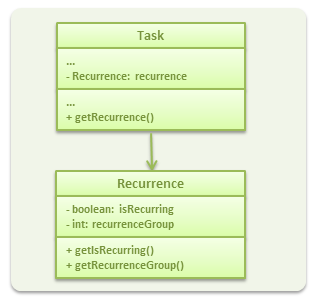
The recurring task feature is implemented through a Recurrence component, which is a parameter for Task.
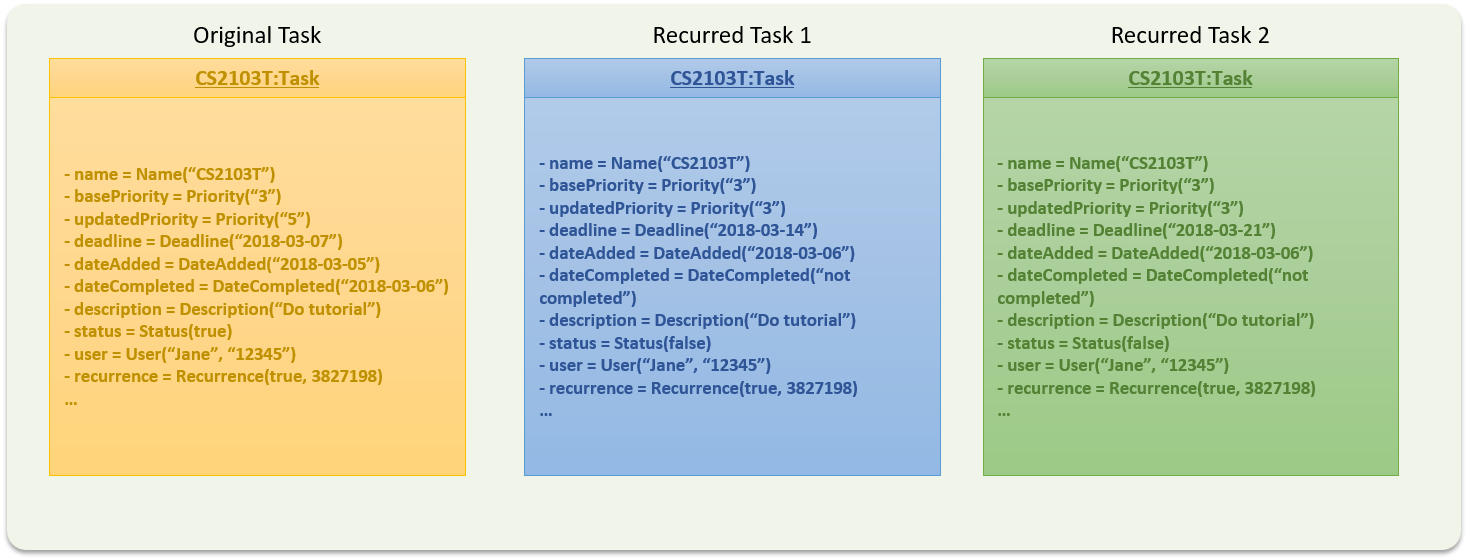
The first recurred version of the task has a deadline set to be a week after the original task’s deadline. The second recurred version of the task (if asked for by the user) has a deadline set to be 2 weeks after the original task’s deadline.
The pattern continues for the rest of the recurred versions.
The recurred versions of the tasks and all their subtasks are set to be Not Completed by default.
Additionally, the priorities of the recurred versions of the tasks are set to be the priority of the orginal task, as last set in the AddCommand or EditCommand. This is done instead of taking the priority of the original task as it is, which could have been changed by PrioriTask through its auto-updating feature.
Both RecurWeeklyCommand and DeleteRecurredTasksCommand are UndoableCommands.
The Recurrence component is implemented using a Recurrence class. The following diagram (refer to Recurrence UML Class Diagram) shows the class diagram for Recurrence.
Scenario
Suppose that the user wants to recur a task weekly.
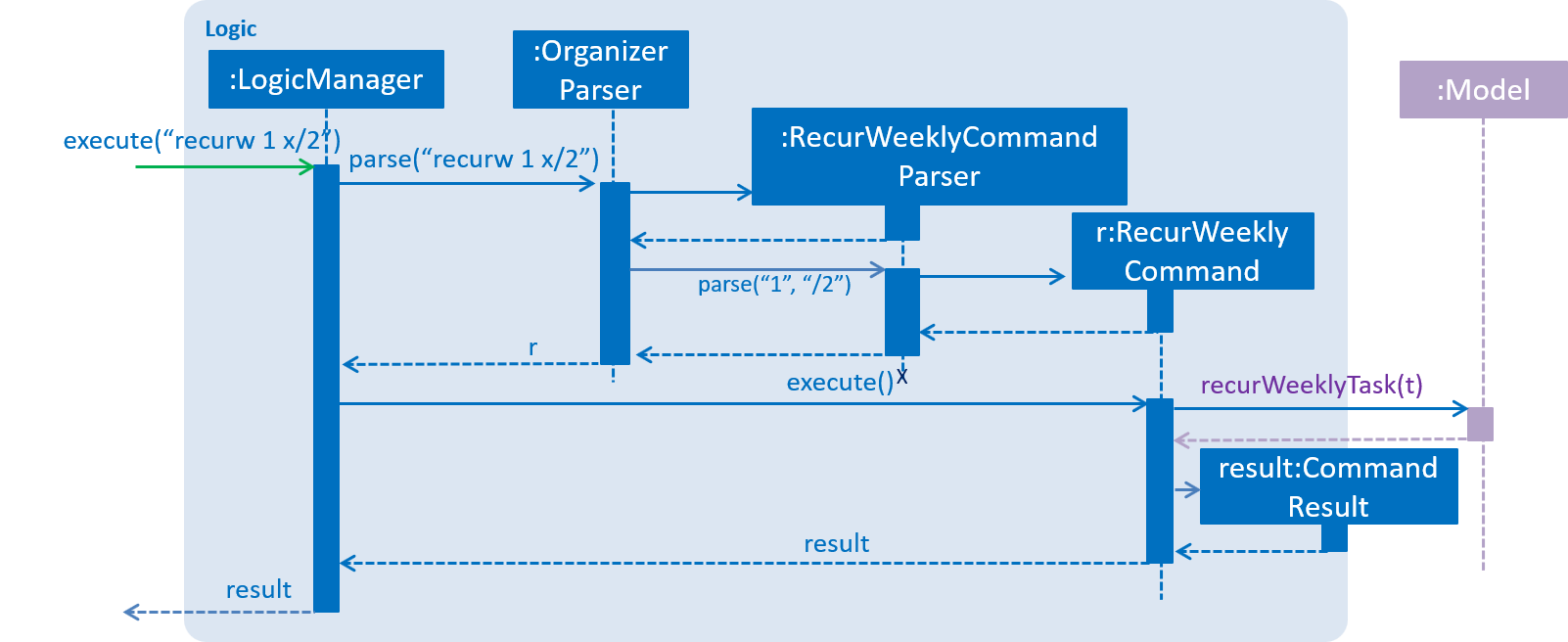
The user executes a new RecurWeeklyCommand, recurw 1 x/2, to recur the 1st task in the organizer weekly for 3 times.
Assuming that the task has not been recurred before, the following sequence diagram (refer to RecurWeekly sequence diagram) shows how the recur weekly operation works:
The object diagram below (refer to Recurred tasks object diagram) shows the original task and the 2 Tasks created after the execution of the command.
Suppose the user now wants to delete the 1st task in the PrioriTask and all its recurred versions.
The user executes a new DeleteRecurredTasksCommand, deleter 1, to delete the task that was just recurred and all its recurred versions.
Design Considerations
Aspect: Implementation of recurrenceGroup in Recurrence
-
Alternative 1 (current choice): Set recurrenceGroup as hash code of the task`
-
Pros: It is guaranteed to be unique, which is needed to identify a group of recurred tasks. It is also easy to implement.
-
Cons: It is not as intuitive to identify the group of recurred tasks using long hash codes.
-
-
Alternative 2: Set recurrenceGroup using a counter.
-
Pros: It is a more intuitive way of identifying recurrence groups.
-
Cons: There is a need to implement a counter for recurrence groups in
Model.
-
Aspect: Implementation of RecurWeeklyCommand
-
Alternative 1 (current choice): Add a new
Taskfor each recurred version of the original task-
Pros: It is easy to implement.
-
Cons: It takes up more memory for Objects that have very similar parameters..
-
-
Alternative 2: Maintain a list for each of the parameters that change when recurred within the original
Task, such as a list ofDateCompletedand a list ofStatus.-
Pros: It will use less memory.
-
Cons: There is a need to change how certain parameters in
Taskare implemented.
-
Aspect: Implementation of DeleteRecurredTasksCommand
-
Alternative 1 (current choice): Add tasks that are not part of the recurrence group into a new task list and set the new task list to replace the old one.
-
Pros: It only reverts changes that are hard to change back (the view can easily be re-modified as no data are * lost).
-
Cons: A user might think that undo also applies when the list is modified (undoing filtering for example), * only to realize that it does not do that, after executing
undo.
-
-
Alternative 2: Remove tasks that are part of the recurrence group while iterating through the task list.
-
Pros: This is a more intuitive way of removing tasks from the list.
-
Cons: There is a need to implement an Iterator to remove tasks, as we cannot use a for loop which can cause undefined behaviour.
-