Overview
PrioriTask is a desktop task manager application written in Java (10~20kLOC). It helps users manage their tasks and priorities through automatic priority updating and sorting. The application also features a calendar which provides users with a chronological overview of upcoming deadlines. The user interacts with PrioriTask by using a Command Line Interface (CLI), and has a Graphical User Interface (GUI) created with JavaFX.
| PrioriTask used AddressBook-Level 4 as a base for development. |
Summary of contributions
-
Major enhancement: added the login system
-
What it does: allows the multiple users to use the application on the same machine. Supports account creation, login, logout, password retrieval, and most importantly private task management.
-
Justification: This feature improves the product significantly because a user now has an additional layer of security for the privacy of their own tasks.
-
Highlights: This enhancement affected all four components :
Logic,Model,StorageandUI. Due to the the reliance of this feature on data structures and logic, changes were mainly made toLogic,Model, andStorage. Code was also ammended inUIas the login system presents a stricter restriction on what is displayed on the GUI. Due to the already existing data structure of AddressBook-Level 4, numerous challenges were faced as the initial design was not optimized for a login system. The current implementation, although not optimally designed due to the amount of time required to rework the data structure and tests, currently works as intended.
-
-
Minor enhancement: added a Priority parameter, and its corresponding auto-updating and autosorting feature (Refer to PrioriTask - Developer Guide : 4.2. Task’s Priority Auto-updating and Auto-sorting feature to find our more).
-
What it does: Automatically updates
Prioritylevels of tasks upon application launch and sorts then in descending order. -
Justification: This feature helps automate task management for the user, which is a key distinction that seperates PrioriTask from other applications.
-
Highlights: This enhancement mainly dealt with
UniqueTaskListinModel. The formula and algorithm for appropriate priority updating faced many challenges due to its dependence on the current date, resulting in the need for in-depth testing to constantly refine it.
-
-
Code contributed: [Functional code] [Test code]
-
Other contributions:
-
Project initialization:
-
Set up GitHub organization and team repo.
-
Set up labels for issue management.
-
Refactor (renaming) 1703LOC before team starts development (Pull request #17).
-
-
Project management:
-
Summarize to-dos and assign tasks to group members in v1.1 and v1.2 (Google Drive link).
-
Manage release
v1.5on GitHub.
-
-
Enhancements to existing features:
-
Fix bugs:
-
Documentation:
-
Community:
-
Tools:
-
Set up Travis on the team’s GitHub repo.
-
-
Contributions to the User Guide
Given below are sections I contributed to the User Guide. They showcase my ability to write documentation targeting end-users. |
User Features
This section explains the commands specific to command inquiry and User account management.
User Parameters
-
USERNAME-
A username can only be alphanumeric characters, must be a minimum of length 5, and must not contain spaces.
-
It is compulsory to set a username.
-
-
PASSWORD-
A password can only be alphanumeric characters, must be a minimum of length 5, and must not contain spaces.
-
It is compulsory to set a password.
-
Signing up: signup or su [since v1.3]
Sign up for a PrioriTask account.
Format: signup u/USERNAME p/PASSWORD
Examples:
-
signup u/patrick p/pat19503
Add userpatrickwith passwordpat19503to PrioriTask. -
signup u/mary123 p/m4ry456
Add usermary123with passwordm4ry456to PrioriTask.
Logging in: login or in [since v1.4]
Login to PrioriTask.
Format: login u/USERNAME p/PASSWORD
Examples:
-
login u/patrick p/pat19503
Login to userpatrick. -
login u/mary123 p/m4ry456
Login to usermary123.
Adding question answer set: addqa [since v1.4]
Add a question answer set for password retrieval. If one currently exists, the new question answer set will replace the current set.
|
Must be currently logged in to a user account on PrioriTask. |
Format: addqa q/QUESTION a/ANSWER
Examples:
-
addqa q/are you male? a/yes
Add questionare you male?with answeryesto current logged user. -
addqa q/are you female? a/yes
Add questionare you female?with answeryesto current logged user.
Retrieving question for user’s password: forgotpassword or fp [since v1.4]
Retrieve the question for user’s password.
Format: forgotpassword u/USERNAME
Examples:
-
forgotpassword u/patrick
Retrive the question for userpatrick. -
forgotpassword u/mary123
Retrive the question for usermary123.
Answering question: answer or ans [since v1.4]
Answer a user’s question to retrieve the password.
|
The question need not be retrieved before an attempt at answering the question. |
Format: answer u/USERNAME a/ANSWER
Examples:
-
answer u/patrick a/yes
Answer password question for userpatrickwithyes. -
answer u/mary123 a/no
Answer password question for usermary123withno.
Deleting an account [coming in v2.0]
Delete a user account to stop using PrioriTask.
Contributions to the Developer Guide
Given below are sections I contributed to the Developer Guide. They showcase my ability to write technical documentation and the technical depth of my contributions to the project. |
Task’s Priority Auto-updating and Auto-sorting feature
Current Implementation
The autoupdating and autosorting mechanism resides inside UniqueTaskList. The UniqueTaskList is responsible for updating each Task’s priority level and sorting the ObservableList<Task> whenever a new Task is added. In addition, whenever a Task is edited, the ObservableList<Task> is sorted again.
Description of UniqueTaskList 's add method
The add method of the UniqueTaskList class is implemented as such:
public void add(Task toAdd) throws DuplicateTaskException {
    //check non null and no duplicate task
    toAdd = updatePriority(toAdd);
    internalList.add(toAdd);
    sortTasks();
}
Priority Auto-updating feature
The updatePriority method returns a new Task with a new Priority based on the current date, AddedDate, and Deadline.
The new Priority level will remain within the range of 0 - 9. The new Priority is calculated as such :
-
If the current date is equal to the
AddedDate, and the current date is equals or after theDeadline.-
Priorityremains the same.
-
-
If the current date is past the
Deadline.-
Priorityis set to theHIGHEST_SETTABLE_PRIORITY_LEVEL: 9
-
-
If the current date is before the
Deadlineand not equal to theAddedDate.-
Priorityis calculated via the following formula :
-
priorityDifferenceFromMax = HIGHEST_SETTABLE_PRIORITY_LEVEL - currentPriority

dayDifferenceCurrentToDeadline = Duration.between(currentDate, deadline)

dayDifferenceAddedToDeadline = Duration.between(dateAdded, deadline)

priorityToIncrease = priorityDifferenceFromMax * ((dayDifferenceAddedToDeadline - dayDifferenceCurrentToDeadline) / dayDifferenceAddedToDeadline)

newPriority = currentPriority + priorityToIncrease
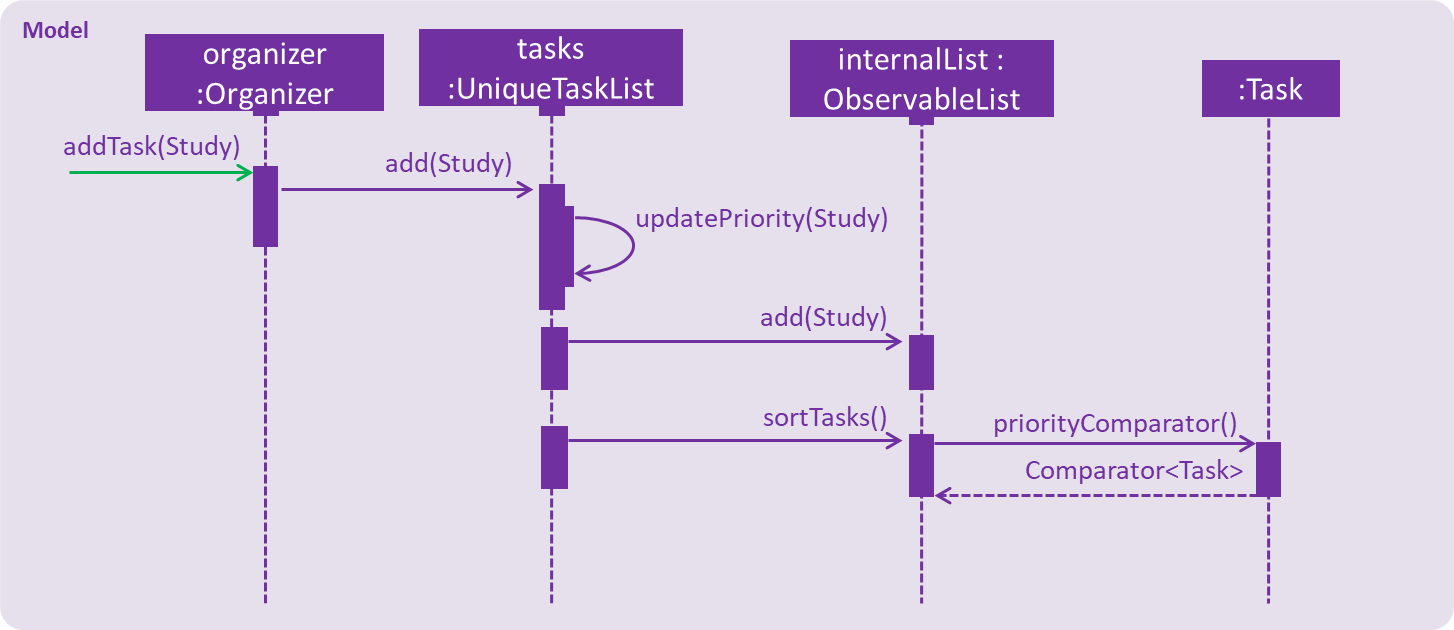
The new Task with its updated Priority will then be added to UniqueTaskList’s internalList. Following that, the internalList is sorted via the sortTasks method. The sortTasks method is implemented as such:
private void sortTasks() {
    internalList.sort(Task.priorityComparator());
}
Task Auto-sorting feature
The sortTasks method makes use of the ObservableList class’s sort method and Task’s priorityComparator method. The priorityComparator method returns a Comparator that sorts Task s based on descending Priority levels. The internalList is sorted with respect to the comparator.
Scenario
Consider an addTask method call by the Organizer. The current date is 2018-03-19.
The following is a sequence diagram (refer to addTask(Study) method execution sequence diagram) which represents the Organizer adding a Study Task.
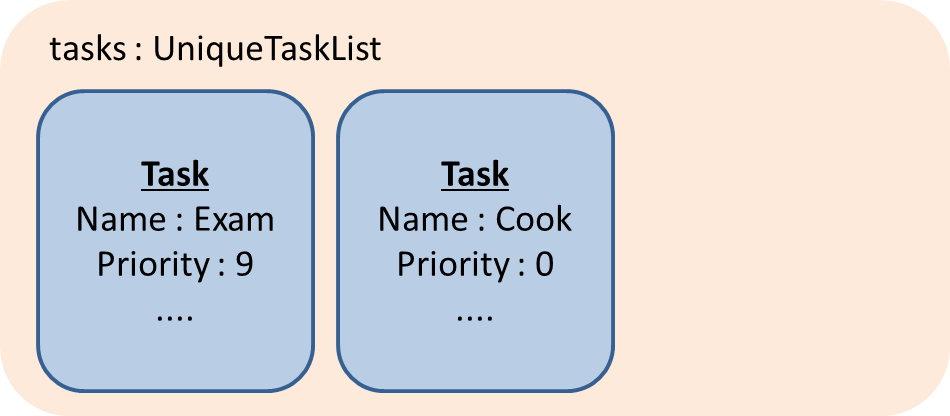
Suppose the tasks currently contains the following two Task s as shown in tasks 's initial Task s.
tasks 's initial Task s"Study" Task represents the "Study" Task.
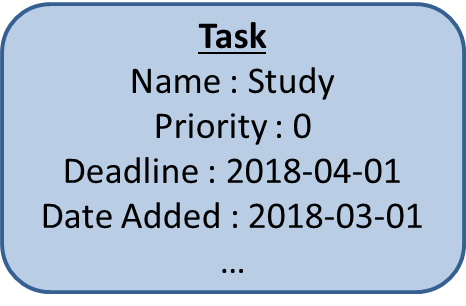
TaskWhen tasks calls updatePriority(Study), the new priority level is calculated as such :
priorityDifferenceFromMax = 9 - 0 = 9

dayDifferenceCurrentToDeadline = 14

dayDifferenceAddedToDeadline = 31

priorityToIncrease = 9 * ((31 - 14) / 31) = 4

newPriority = 0 + 4 = 4
A new "Study" Task is created and added to the internalList as shown in internalList after "Study" Task is added.
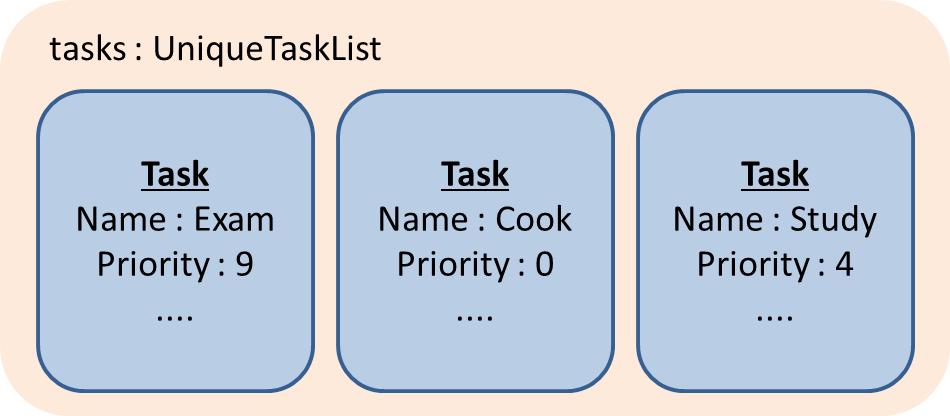
internalList after "Study" Task is addedThe sortTasks method is then called, which calls the priorityCompartor method, and uses the Comparator returned to sort the Task s. This results in the following UniqueTaskList as show in internalList after sortTasks is called.
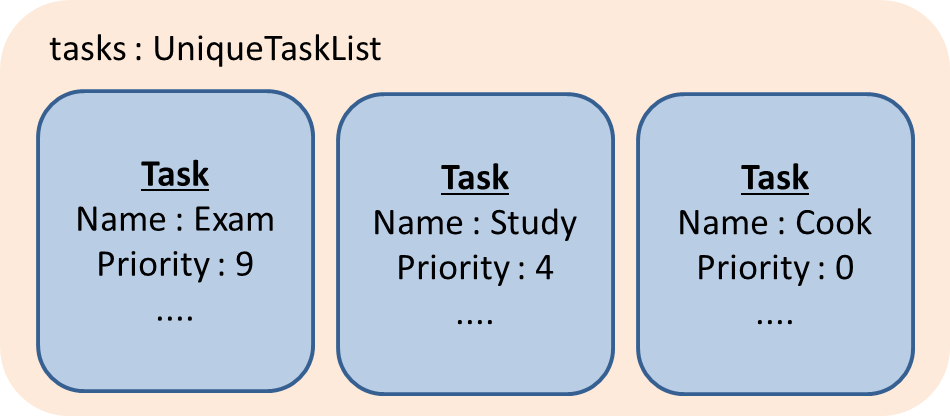
internalList after sortTasks is calledDesign Considerations
Aspect : Implementation of updatePriority
-
Alternative 1 (current choice): Add a new method
updatePriorityin UniqueTaskList’sadd-
Pros : It is convenient to update the priority during this method call; since during initialization of
Organizer,addis called for everyTaskto initialize theUniqueTaskList. -
Cons : There is a possible violation of Single Responsibility Principle and Separation of Concerns as
UniqueTaskListnow updatesTaskpriorities and storesTasks.
-
-
Alternative 2 : Add a new class
UpdatedUniqueTaskListwhich extendsUniqueTaskList-
Pros : This prevents the violation of Single Responsibility Principle and Separation of Concerns in Alternative 1.
-
Cons : This repeats the logic in
UniqueTaskListby adding one method.
-
Aspect : How updatePriority executes
-
Alternative 1 (current choice) : Return a new
Taskwith newPriority-
Pros : It is easy to implement.
-
Cons : A new object is created twice during every addition, even if
Priorityis not updated; Hence slightly inefficient.
-
-
Alternative 2 : Edit the
Priorityparameter of theTask-
Pros : No new objects are created.
-
Cons : It requires a major overhaul of
Taskand it’s parameters to be mutable.
-
Aspect : Scope of updatePriority and sortTasks
-
Alternative 1 (current choice) : Implement within
Model-
Pros : There is no need to deal with commands, and fits with the idea of automation.
-
Cons : The concern of updating priorities and sorting tasks may not lie with
ModelbutLogic.
-
-
Alternative 2 : Implement within
Logic-
Pros : It fits with the concern of updating priorities and sorting tasks.
-
Cons : It requires development of commands and extra command calls to be automatically called upon start of application; unnecessary trouble for same feature.
-