Overview
PrioriTask is a desktop task manager application written in Java (10~20kLOC). It helps users manage their tasks and priorities through automatic priority updating and sorting. The application also features a calendar which provides users with a chronological overview of upcoming deadlines. The user interacts with PrioriTask by using a Command Line Interface (CLI), and has a Graphical User Interface (GUI) created with JavaFX.
| PrioriTask used AddressBook-Level 4 as a base for development. |
Summary of contributions
-
Major enhancement: added the Subtask management system
-
What it does: It allows users to split and manage their task separately. Support Adding, removing, editing, and setting status for each subtask.
-
Justification: This feature improves the product significantly because users will be able to better manage big tasks (epic) becuase they will be able to split those into smaller, more independent task.
-
Highlights: This enhancement affected four components :
Model,Storage,Logic, andUI.UIcomponent is touch only becuase we need to show the subtask somewhere on the ui. Most of the changes happened in the other three components. The most challenging part is to decide how the sutbask data structure will be implemented. Even though it is possible to use faster and more efficient data structure, limited time and the bug-prone nature of the algorithm pushed me to do a compromise between speed and code correctness.
-
-
Minor enhancement: added a Status parameter, and its corresponding toggle function.
-
What it does: It gives user ability to mark their task/subtask as completed or not completed
-
Justification: It helps user to differentiate completed task without actually deleting them.
-
Highlights: Mainly highlights the immutability of the task. Since I have to preserve the task immutability.
-
-
Code contributed: [Functional code] [Test code]
-
Other contributions:
-
Project initialization:
-
Refactor (renaming) 1669LOC before team starts development (Pull request #17).
-
-
Community:
-
Contributions to the User Guide
Given below are sections I contributed to the User Guide. They showcase my ability to write documentation targeting end-users. |
Subtask Features
Subtask Management Features
This section explains what a Subtask is, and the commands to manage them.
Subtask Parameters
-
NAME-
A name can only be alphanumeric characters and spaces, and should not be blank.
-
It is compulsory to set a name.
-
-
STATUS-
A state can only be one of two values : Done or Not Done.
-
By default, every new task is marked as Not Done.
-
Adding a subtask to a task : adds or as [since v1.2]
Add a subtask to an existing task.
Format: adds INDEX [n/NAME]
-
Adds the subtask at the specified
INDEX. The index refers to the index number shown in the last subtask listing. The index must be a positive integer (i.e. 1, 2, 3, …).
Example:
-
adds 1 n/Submit report
Adds a subtask with nameSubmit reportto the 1st task.
Deleting a subtask from a task: delete-subtask or ds [since v1.3]
Delete the specified subtask from PrioriTask.
Format: delete-subtask TASK_INDEX SUBTASK_INDEX
-
Delete the
SUBTASK_INDEX-th subtask of task at the specified bySUBTASK_INDEX. -
The index refers to the index number shown in the most recent listing.
-
The index must be a positive integer (i.e.
1, 2, 3, …).
Examples:
-
list
delete-subtask 1 1
Deletes the first subtask of the first task in PrioriTask. -
find cleaning
delete-subtask 2 4
Deletes the fourth subtask of the second task in th result offind cleaningcommand.
Editing a subtask: edits or es [since v1.5]
Edit name of a subtask.
Format: edits TASK_INDEX SUBTASK_INDEX n/NAME
-
Edit the
SUBTASK_INDEX-th subtask of task at the specified bySUBTASK_INDEX. -
The index refers to the index number shown in the most recent listing.
-
The index must be a positive integer (i.e.
1, 2, 3, …).
Examples:
-
list
delete-subtask 1 1 n/Do some research
Changes the first subtask of the first task name toDo some research. -
find cleaning
delete-subtask 2 4 n/Run for 7.87 Km
Change the fourth subtask of the second task in the result offind cleaningcommand name toRun for 7.87 Km.
Marking subtask as complete: toggle-subtask or ts [since v1.3]
Toggle the status of the subtask identified by the index number used in the last subtask listing
between Completed and Not Completed.
Format: toggle-subtask TASK_INDEX SUBTASK_INDEX
-
Toggle the status of the
SUBTASK_INDEX-th subtask of task at the specified byTASK_INDEX. -
The index refers to the index number shown in the most recent listing.
-
The index must be a positive integer (i.e.
1, 2, 3, …).
Examples:
-
list
toggle-subtask 1 1
Toggles the first subtask of the first task in PrioriTask. -
find homework
toggle-subtask 2 4
Toggles the fourth subtask of the second task in th result offind homeworkcommand.
Reordering subtask [coming in v2.0]
Reorder subtasks using a given condition.
Contributions to the Developer Guide
Given below are sections I contributed to the Developer Guide. They showcase my ability to write technical documentation and the technical depth of my contributions to the project. |
Subtask Implementation
Subtask
Current Implementation
Subtask feature allows users to split their tasks into multiple subtasks. This feature allows users to better
manage their task. It is implemented using Subtask class and UniqueSubtaskList class as shown by Subtask UML Class Diagram below:
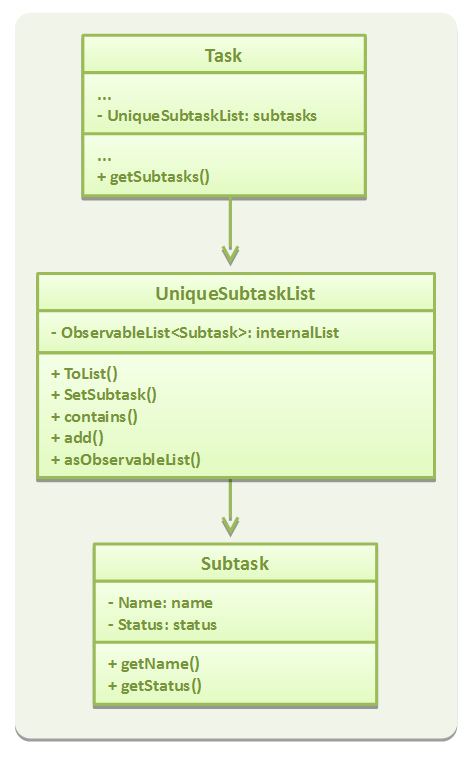
UniqueSubtaskList is created to ensure that no task has a duplicated subtask.
Subtask management
To manage the subtasks (Add, edit, etc), a copy of the Task object is created, since Task is immutable.
Design Considerations
Aspect: Implementation of Subtask
-
Alternative 1 (current implementation): Add a new class
Subtask-
Pros: There is better isolation, and allows for easier modification to
Subtaskif needed. -
Cons: It restricts the possibility of having a subtask that has subtasks.
-
-
Alternative 2: Use current
Taskclass-
Pros: It is easier to implement and subtask will share the same properties with
Task. -
Cons: There is a ossibility of having a cyclic subtask (a task that is also a subtask of it self) if not handled carefully.
-
Aspect: Implementation of UniqueSubtaskList
-
Alternative 1 (current implementation): Use
Listto store subtasks.-
Pros: It is easier to implement.
-
Cons: There will be performance issues when data is large, since most operations in
UniqueSubtaskListisO(n).
-
-
Alternative 2 (Planned for implementation): Use a combination of BBST and LinkedList to store subtasks.
-
Pros: If is faster than the first alternative since each operation is
O(log n). -
Cons: It is harder to implement and more robust testing is required since it is more bug prone.
-